Comprehensible input for Mandarin & Japanese learners
Comprehensible Japanese audio, one sentence at a time — Mandarin too.
Paste Japanese or Mandarin text with its English translation, or bring an audiobook and its English version. Bilingual Mix lines up every sentence and gives you one MP3: hear the meaning, then hear it spoken. Comprehensible input you actually understand — on your commute, on a walk, anywhere.
Best for comprehensible Japanese at JLPT N4–N3 — learners who know every word but lose the sentence at real speed — and for HSK listening practice at level 3–4 in Mandarin.
$9.99/mo · $79.99/yr · 14-day refund (first payment, usage <10%)
No sign-up needed: 2 runs a day, 20 min in total (10 min per run). Register free to double it — 4 runs / 40 min a day. Text-to-speech: 2 free tries in total. Listening needs no login — already have two recordings? Pair them below ↓.
Full %DUR% track — both languages, every pair twice. Download it and keep it. Listen first, decide after: no login, no upload, no card.
No paired audio? Paste your text and let AI voice it →
bilingualmix.com/mcp.
Popular guides
Start with Japanese listening
Your listening studio
Build your bilingual mixed track
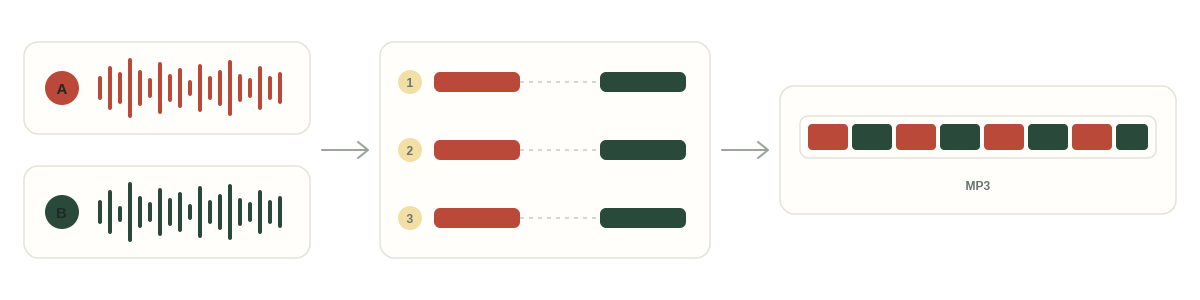
Choose two recordings of the same story or lesson. We match the lines, then make one clean track you can replay anywhere.
Both files should contain the same content in the same order. Different speaking speeds are fine. MP3 only · up to 50 MB per file.
Fine-tune your listening track
- 1Bring two familiar recordingsUse the same dialogue, story or lesson in Mandarin and English.
- 2Let the lines find each otherAutomatic speech recognition aligns the matching sections—even when speakers have different pacing.
- 3Listen wherever you likePreview the result, download an MP3 and replay short, meaningful chunks.
Made for real-life listening
Familiar meaning. Fresh Mandarin.
Stay with the story
Work with bilingual audiobooks, course recordings and dubbed dialogue you already have.Choose your rhythm
Start with English meaning or go straight to Mandarin. Set pauses only if you want them.Take it with you
Export a standard MP3 for your phone, computer or favourite audio player.Your file, your browser
Groq transcribes the audio; Cloudflare Workers AI pairs the transcript text across languages. Raw audio is not stored; the final cut-and-join happens on your device.Good to know
Before you press play.
What does Bilingual Mix do?
Bilingual Mix makes one interleaved audio track for bilingual listening practice: each line in Mandarin or Japanese is followed by its English counterpart. Start from text with AI voices in Doc to Audio, or pair two recordings you already own — in that case both voices stay original and nothing is translated or re-recorded. The output is sentence by sentence audio you can use on any player.
Do I need two recordings of the same audio?
No. Paste Chinese or Japanese text with its English translation into Doc to Audio and AI voices both sides — no source audio needed. If you already own two recordings, Chinese English audio and Japanese English audio both work in the workbench below; content and sentence order must match, but timing and speaking pace do not.
Which files can I use?
MP3 only, up to 50 MB per file. A single free run can cover up to 10 minutes of audio across both files; membership raises that to 45 minutes per run. Longer files are easier to handle in a desktop browser.
Is it free?
Yes. The free tier needs no sign-up: 2 runs a day, 10 minutes per run. A free account doubles it to 4 runs and 40 minutes a day. Paid plans are $9.99 per month or $79.99 per year, each with 500 minutes a month.
Where is my audio processed, and is it stored?
Raw audio is sent to Groq for sentence timestamps and transcript text is sent to Cloudflare Workers AI for cross-language pairing. We do not store the raw audio or the transcript; the final cut-and-join runs in your browser.
Can I choose which language comes first?
Yes. Open the track settings and pick Mandarin first, Japanese first, or English first. Pauses default to zero and you can add them if they help you practise.
Do the two recordings need the same length or pace?
No. Pairing uses the transcript and the order in which sentences appear rather than matching timestamps, so different speaking speeds are fine. You can expand the pair table after processing to check the result.
What can I play the exported file on?
The export is a standard 192 kbps MP3, so it plays on phones, computers, car stereos and dedicated listening players. No app or account is needed to listen.
Why are songs or instrumental sections skipped?
Speech recognition works best on spoken dialogue. Singing and purely instrumental passages cannot be aligned reliably, so they are skipped or may land incorrectly — which keeps every line in the result a clean pair.