Chrome extension
Two recordings, one alternating track — now in your toolbar.
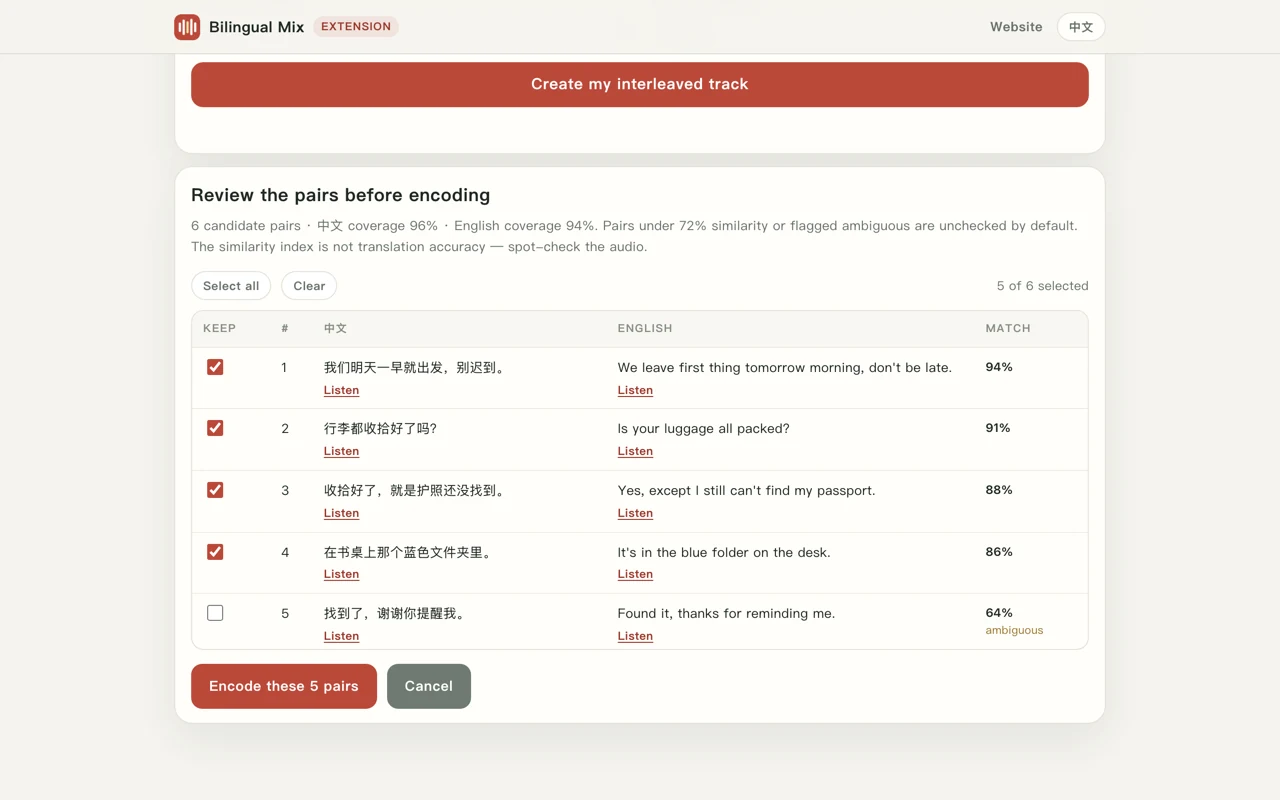
Pick the same story, podcast or lesson in two languages. The extension pairs the matching sentences, lets you check them, then cuts and joins one MP3 at your own pace. Transcription runs on our server; the cutting, joining and encoding never leave your machine.
- Chrome 116+
- Works without an account
- 2 free runs a day
- Files stay on your device
One quota, website and extension
Not signed inFree minutes are counted per account, not per product. Sign in on this page, press Connect this browser, and the extension spends from the same daily or monthly allowance you use on the website. Nothing is charged twice and there is no second subscription — a member's 500 minutes are the same 500 minutes in both places.
No account yet? Create one free — email only, 4 runs / 40 minutes a day instead of 2 / 20.
Connect this browser
The extension is asking for access to your account quota. Confirm below and it will pick the connection up within a few seconds.
Opening the extension and pressing Connect account brings you back to this page. You can disconnect at any time from the extension; the token it holds then stops working.
What each tier gets you
- No account 2 runs / 20 min Per day, counted by IP address. Up to 10 minutes of audio per run (both files together).
- Free account 4 runs / 40 min Per day, counted per account. Connect the extension and both places draw from this same pool.
- Member 500 min / month Up to 45 minutes of audio per run. Monthly or annual, shared between the website and the extension.
How it works
- Pick two filesMP3, M4A or WAV up to 50 MB each — the same content in two languages, in the same order.
- Check the pairsSentences are matched across the two tracks. Anything under 72% similarity arrives unchecked so you can listen before keeping it.
- Download the MP3Cut, joined and encoded at 192 kbps on your own machine. Nothing is uploaded for that step.
Installing it
The listing is still in review. Once it is approved the button above points straight at the Chrome Web Store; until then you can load the same build yourself in about a minute.
Install the unreleased build
- Download the extension zip and unzip it.
- Open
chrome://extensionsand turn on Developer mode (top right). - Click Load unpacked and choose the unzipped folder.
- Pin Bilingual Mix to the toolbar and open it.
Permissions, in full: storage (remembers your language and pause settings) and https://bilingualmix.com/* (the alignment API). No content scripts, no tabs, no downloads, no reading the pages you browse. Details in the extension privacy policy.
Questions
Does the extension upload my audio?
Only for transcription: both files go to bilingualmix.com, which passes them to speech recognition so each line gets a timestamp. The server does not keep the audio or the transcripts. Cutting, joining and MP3 encoding happen locally through WebAssembly.
Is the extension a separate subscription?
No. There is one quota per account. Anonymous visitors get 2 runs / 20 minutes a day by IP; a signed-in free account gets 4 runs / 40 minutes; a membership gives 500 minutes a month. The website and the extension spend from the same number.
How do I disconnect?
Press Disconnect in the extension. The token is deleted from local storage and the next run goes back to the anonymous allowance. Signing out of the website does not break anything — it just stops renewing the connection.
Does it work on other browsers?
The build is Chromium/Manifest V3, so it also loads in Edge and other Chromium browsers. Only Chrome has been tested.